
With more AI website builders and code generators entering the market, some say that AI is already replacing web designers. However, don’t jump to rushed conclusions or panic. Although AI website builders do provide casual users and small businesses with a way to design and launch websites without professional skills, AI is also becoming a powerful assistant for web designers themselves.
According to recent industry surveys, 86% of creators now actively use generative AI in their workflows. Rather than replacing designers, AI is helping them deliver faster and focus on high-value creative work.
AI allows web designers to tackle complex projects faster, delegate simple tasks, and focus on quality, UX decisions, and strategic thinking. If you run a design agency or freelance in web design, learning how to leverage AI website builders effectively can give you a competitive advantage and help you take on more clients.
In this article, we will explore how web designers can use AI website builders to work smarter, deliver faster, and impress clients more consistently.
AI Website Builders vs Traditional Website Builders
Traditional website builders (Wix, Squarespace, Webflow) offer premade components and templates — an arsenal of tools that still require significant manual work. Designers must choose layouts, structure pages, and adjust content step by step.
AI implemented in website builders opens new possibilities, but the extent of these capabilities differs from one platform to another. For example:
- Wix ADI can generate full website drafts based on a questionnaire
- Framer AI can generate layouts and copy from prompts
- Webflow AI assists with content and structure, but still requires manual design control
- Squarespace Blueprint AI helps mainly with template selection and setup
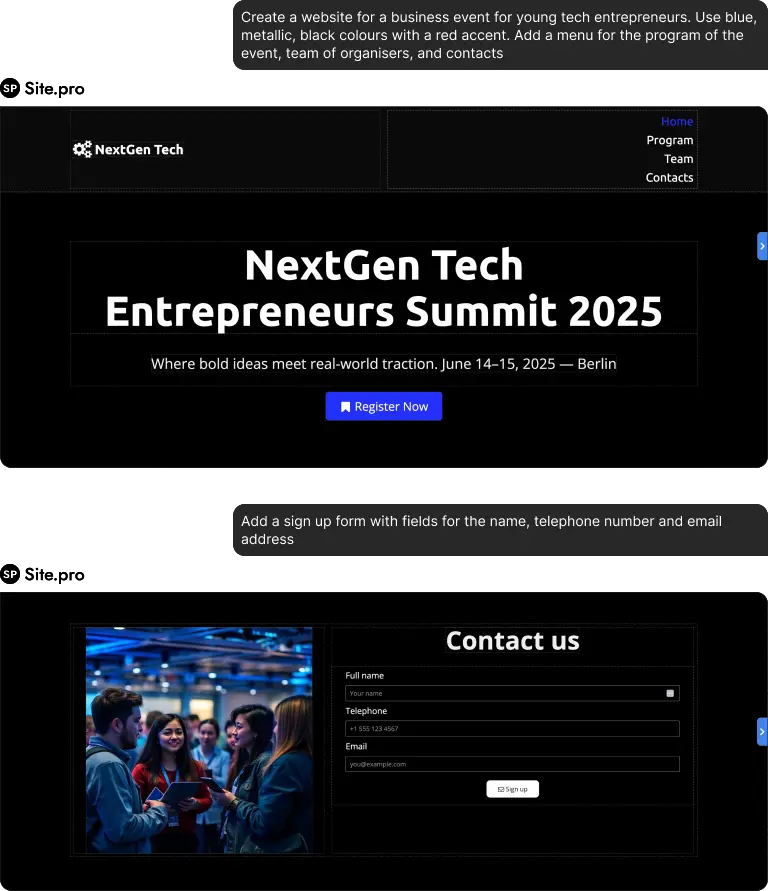
While on Squarespace, Blueprint AI only helps to choose templates, the AI assistant on Site.pro has full control over the editor functions.
Site.pro became one of the first website builders with a fully integrated AI assistant that can automatically perform all the tasks that had to be done manually — moving components, replacing content, changing the design, and adding new pages. It generates new elements, but is also able to edit existing ones. Everything can be done within the chat, as the website builder understands conversational commands.
Upsides of AI Assistance
- Speed. AI can generate full website drafts in minutes and quickly make iterations. Designers can create multiple prototypes for clients in a short time.
- Automation. It handles layout suggestions, typography pairing, color palettes, and content structure automatically.
- Creative support. Instead of starting from a blank page, designers have AI-generated concepts to refine and improve.
A recent report noted that designers using AI-assisted tools complete routine tasks up to 40% faster, allowing more time for strategy and creative direction.
Isn’t It Just for Casual Users?
One common misconception is that AI website builders are only useful for beginners or non-designers because they simplify website creation through conversational interfaces and minimal manual work. In reality, professional web designers often benefit the most from these tools.
Here’s why:
- A web designer who understands design principles can fully utilize AI to create a high-quality product. They know exactly which tasks to delegate and which require manual control. AI reduces repetitive work, allowing designers to focus on branding, UX strategy, and customization.
- AI is good at creating simple pages and using templates, but it often lacks originality — AI-generated websites without further editing can look similar. A professional designer knows where to step in and refine details.
- Faster turnaround means handling more clients and projects, which often leads to increased revenue. Especially when it comes to complex projects like corporate websites, SaaS platforms, and online stores, businesses still prefer experienced designers to guide the process.
Real Workflow Example: Using AI in a Client Project
A freelance web designer working with small business clients might use AI like this:
- Use an AI builder to generate 3 homepage layout options in 10 minutes
- Present concepts to the client the same day
- Let AI generate initial copy and structure
- Refine branding, UX flow, and custom sections manually
- Use AI optimization tools for SEO and responsiveness before launch
What previously took 1–2 weeks of back-and-forth can now be reduced to hours, while maintaining quality and customization.
5 Lifehacks for Web Designers Using AI Website Builders
1. Use AI to Create Instant Wireframes and Prototypes
Instead of starting every project from scratch, use AI builders to generate initial layouts based on:
- Industry (real estate, e-commerce, portfolio, etc.)
- Brand style
- Target audience
- Business goals
Lifehack: Generate 3–5 AI layout variations and present them to the client as concept options. This speeds up approvals and positions you as highly efficient.
You can then refine the chosen version instead of designing everything manually or presenting empty templates.
2. Let AI Generate Content — Then Refine It
AI website builders often have built-in content generation tools for:
- Headlines
- About pages
- Service descriptions
- Call-to-action sections
- Product descriptions
Lifehack: Use AI-generated copy as a first draft, not the final version. Edit it to match brand voice and SEO strategy. This saves hours of writing time and helps clients who struggle to provide content.
Bonus: Create multiple headlines or CTA variations instantly and A/B test them.
3. Use AI Design Suggestions to Beat Creative Block
Every designer faces creative blocks sometimes. AI website builders can generate instant iterations for:
- Color palettes
- Font combinations
- Section layouts
- Image styles
- UI patterns
Lifehack: When stuck, prompt the AI builder to redesign the same page in different styles (modern, luxury, minimalist, corporate, bold). Use the results as inspiration rather than final designs.
4. Automate SEO and Mobile Optimization from Day One
AI website builders often include automatic:
- SEO meta generation
- Mobile responsiveness
- Speed optimization
- Image compression
- Accessibility suggestions
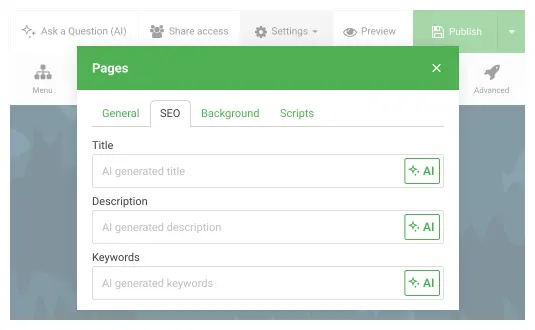
Lifehack: Before handing a site to a client, run AI optimization tools and review suggestions. For example, on Site.pro you can generate meta-information and keywords, as well as instantly see a snippet of how the website will appear on Google. AI-generated websites will adapt to different screens automatically.
This allows you to deliver an SEO-ready and performance-optimized website without hiring a separate specialist, which is useful when clients want an all-in-one solution quickly.
5. Build Faster for Clients and Increase Your Revenue
Speed is profit in web design. AI website builders can reduce the time from build to launch dramatically.
- Take on more clients
- Provide affordable starter sites
- Scale your design business
Lifehack: Create pre-built AI website templates for common industries you serve (restaurants, consultants, e-commerce, NGOs, etc.). When a new client arrives, generate their site using your optimized AI template and customize it.
You can also develop prompts that work best for consistent iterations.
This turns your workflow into a repeatable system and significantly boosts income.
Conclusion
AI website builders are here to empower web designers, not replace them. The future of web design belongs to professionals who know how to combine human creativity with AI efficiency.
Designers who learn to integrate AI into their workflow can deliver projects faster, handle more clients, and focus on the creative and strategic decisions that truly matter. By using AI website builder features strategically, professionals can work smarter, deliver better results, and stay competitive in a rapidly evolving industry.